엑셀의 단축키를 전부 정리해보고자 맘을 먹은게 어언 2년째..
그 동안 2010으로 버전업도 되고 해서.. 2010버전을 기준으로 단축키 리스트를 업데이트 했습니다.
(버전별로 추가된 단축키는 음영과 주석으로 따로 표시했습니다. 2003, 2007, 2010버전 사용자 모두 참고할 수 있습니다.)
단축키를 정리하는데 10시간 정도 걸렸네요..
아직 확인이 안된 단축키나 오류가 있을 수 있습니다.
댓글로 알려주시면 인류 공헌에 이바지하시게 됩니다.
첨부파일는 3개의 시트로 구성되어 있습니다.
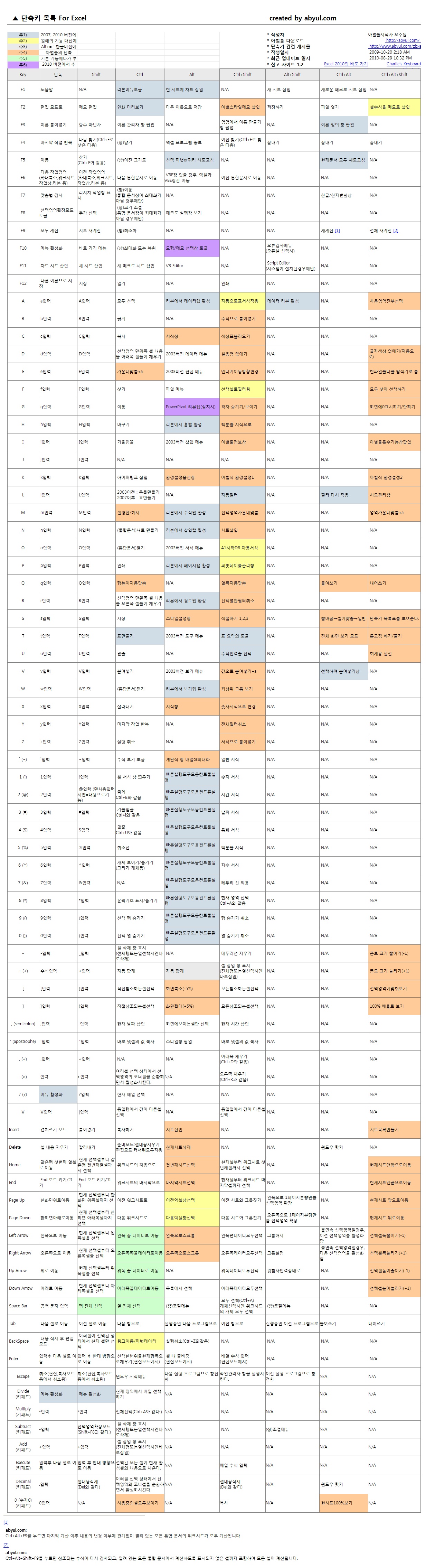
xlShortCut_FullVersion : 엑셀 전체 단축키 목록
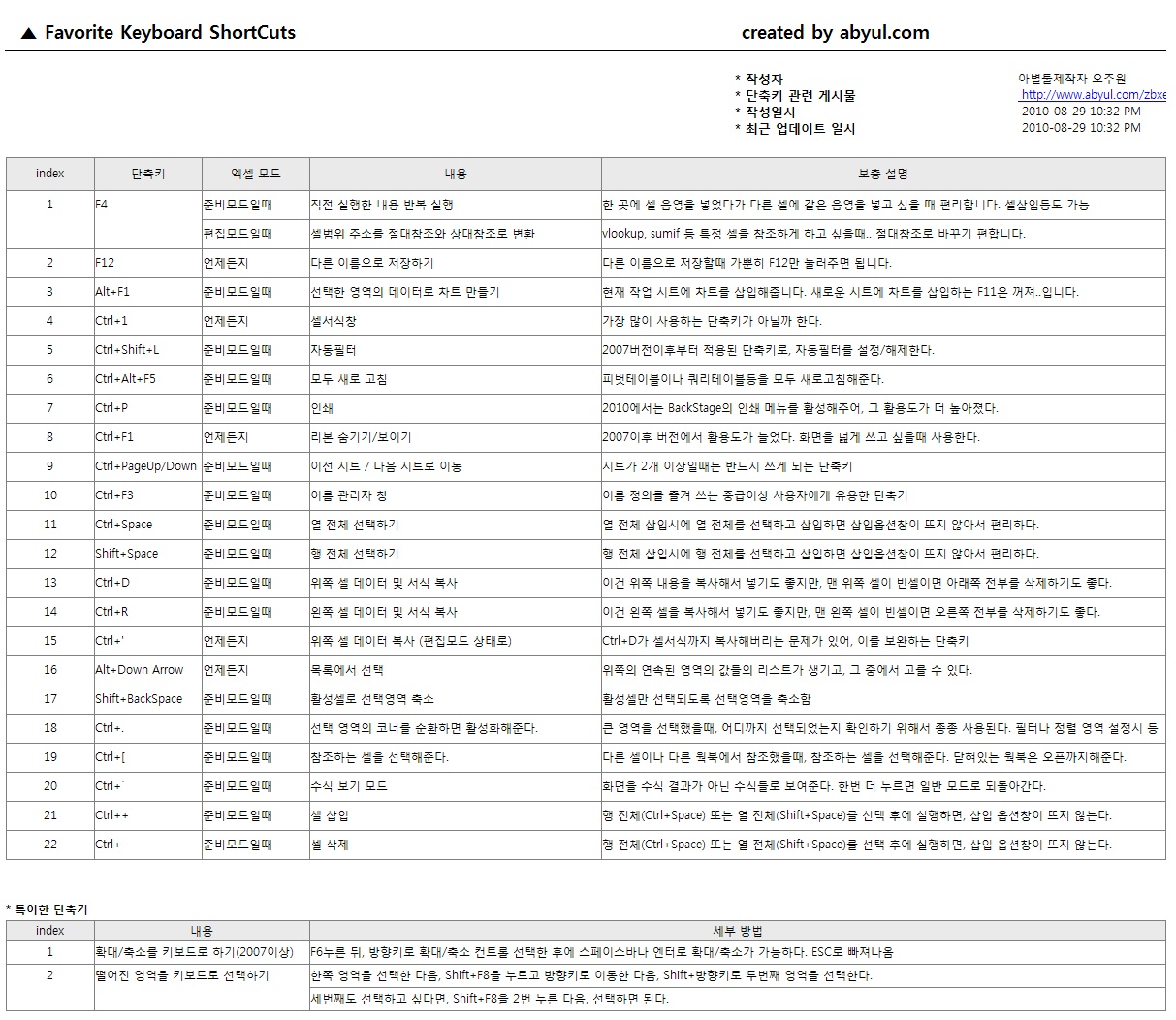
Favorite_ShortCuts : 즐겨 쓰는 단축키
Alt키조합 : 2003버전에서 사용되는 Alt단축키 시퀜스. 2007과 2010에서도 일부 사용 가능합니다.
엑셀 파일 다운 받기 : abyul.com_Excel_ShortCutList_20111219-1.xls
그냥 받아만 가지 마시고..
댓글이나 쪽지로 "수고했다~" 한말씀해주시면 힘이 날 것 같네요..
이 파일은 출처만 명확히 발혀주신다면 다른 곳에 퍼가셔도 됩니다.
출처 : http://abyul.com/zbxe/83509
아래 이미지 파일들은 첨부된 엑셀 파일을 이미지로 만든 것입니다.
다운 받기 전에 확인해보세요.
[ xlShortCut_FullVersion]
[ Favorite_ShortCuts ]
[ Alt키조합 ]

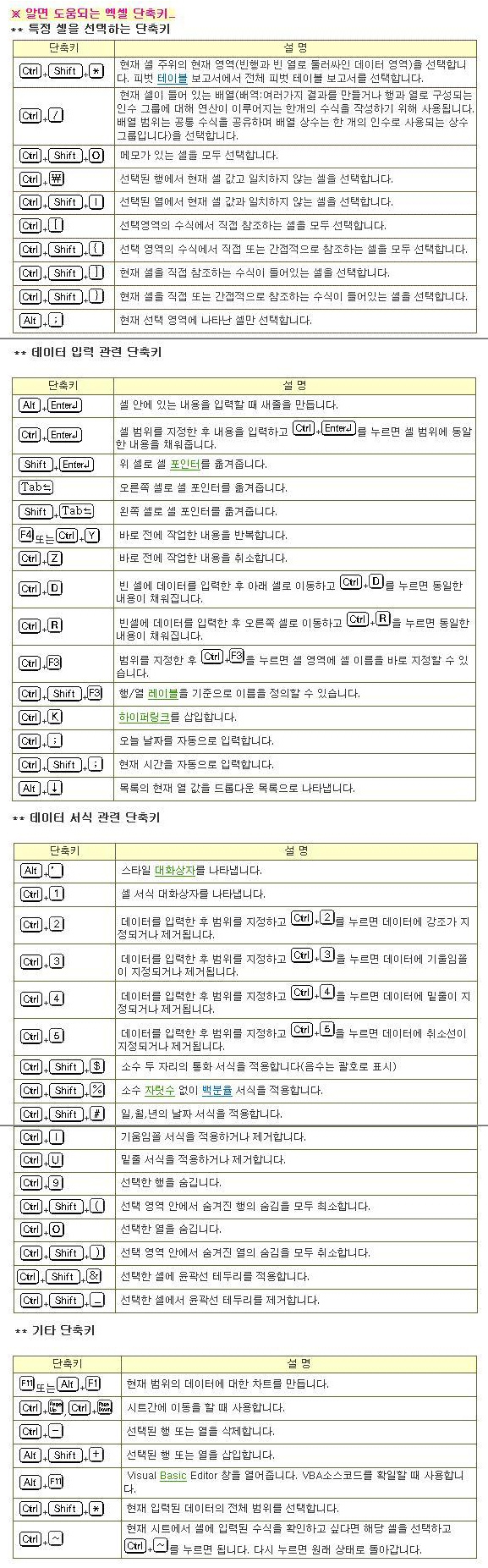
아래 이미지는 퍼온 겁니다.
자주 사용되는 아이들만 모아놓은 것이 초보자 분들에게는 유용할 듯 싶어 퍼왔습니다.
출처 : http://k.daum.net/qna/view.html?qid=3UlYa
===========================================================================================
아래 내용도 퍼온겁니다. ㅎㅎ
저는 개인적으로 Alt+o+h+r을 많이 사용합니다. 시트이름 바꾸는 단축키죠.. ㅎㅎ
출처 : http://cafe.naver.com/excelmaster/8191
피벗테이블 : alt + d + p + l 이후 해당항목 끌어다놓고 닫음됩니다.
부분합 : alt + d + b
ctrl + [Home] : A1셀로 바로 이동
ctrl + [End] : 작업영역 중 가장 마지막 셀로 이동
ctrl + [Page Up] : 앞시트로 이동
ctrl + [Page Down] : 뒷시트로 이동
ctrl + ~ : 셀입력수식 보기
ctrl + * : 연결된 영역 전체선택 ========> 이것보다는 Ctrl+A누르시는게 훨씬 편합니다.
ctrl + [Insert] : 복사하기 ========> 복사가 되긴 합니다만.. 굳이 외우실 필요는.. ㅎㅎ Ctrl+C가 있으니까요~ ㅎㅎ
Shift + [Delete] : 잘라내기 ========> 이 아이도.. Ctrl+X가 있어서.. ㅎㅎ 굳이.. ㅎㅎ
Shift + F2 : 메모
alt + E + L : 시트삭제 ========> 은근 자주 씁니다. 아별툴 사용자는 Alt+Del를 쓰겠죠.. ㅎㅎ
Shift + F11 : 새시트삽입 ========> 은근 자주 씁니다. 아별툴 사용자는 Alt+Insert를 쓰겠죠.. ㅎㅎ
alt + i + w : 새시트삽입
alt + i + r : 행삽입 ========> 저는 행 전체 선택 후(Shift+SpaceBar) Ctrl++(키패드) 눌러서 행삽입합니다. ㅎㅎ
alt + i + c : 열삽입 ========> 저는 열 전체 선택 후(Ctrl+SpaceBar) Ctrl++(키패드) 눌러서 행삽입합니다. ㅎㅎ
alt + e + d + r : 행삭제
alt + e + d + w : 열삭제
alt + o + c + w : 열너비 ========> 이것보다는 열너비 자동 맞춤해주는 Alt+o,c,a를 많이 쓰네요.. ^^
alt + o + r + e : 행높이
alt + F1 : 차트생성
F5 + O + K : 선택영역 중 빈셀만 선택 ========> 음.. F5다음에 있는 O가 뭔지 모르겠어요.. 저는 Ctrl+G, Alt+S, K 이렇게 씁니다만..
(F5 + O + 선택하고픈 셀들로 설정가능. ex> 상수숫자ㆍ텍스트, 수식 숫자ㆍ텍스트, 동일열(혹은 행)에서 값이 다른 셀, ... 등)
alt + v + p : 페이지 나누어 보기
alt + v + n : 기본 보기
alt + f + u : 페이지 설정 (인쇄화면 설정)
생각나는대로 이정도요. 제가 자주 쓰는 것들인데, 알아두심 유용할 듯 싶네여^^
===========================================================================================
이것도 펌..
출처 : http://www.exceltip.com/st/The_Best_Shortcut_Keys_in_Microsoft_Excel/1.html
» The Best Shortcut Keys in Microsoft Excel
| Ctrl+Z |
Undo |
Ctrl+C
Enter, Ctrl+V Ctrl+X |
Copy,
Paste, Multiple Paste, Cut |
Ctrl+F, Ctrl+H |
Find, Find&Replace |
Ctrl+P, Ctrl+S, Ctrl+F4, Alt+F4 |
Print, Save, Close, Close Excel |
| Ctrl+Arrow |
Move to edge of region |
Ctrl+*
|
Select current region |
| Ctrl+A |
Select all cells |
Ctrl+Home Ctrl+End |
Select A1, Select last cell in used range |
| Ctrl+Shift+End |
Select from active cell to last cell in used range. |
| Ctrl+Shift+Home |
Select from active cell to A1 |
Ctrl+Page Down Ctrl+Page Up |
Move to the next sheet, Move to the previous sheet |
| Ctrl+Tab |
Move to next open workbook |
| Ctrl+N |
Open new workbook |
| Shift+F11 |
Insert new worksheet |
| Shift+F3 |
Paste function window |
| =+FunctionName+Ctrl+A |
Insert new function |
| Alt+F11 |
Open VBE |
| Ctrl+Shift+Enter |
Array formula |
Ctrl+F3, F3 |
Define name, Paste name |
Ctrl+Spacebar Shift+Spacebar |
Select columns, Select rows |
Ctrl+1, Ctrl+B, Ctrl+U |
Format cells, Bold, Underline |
Ctrl+; , Ctrl+shift+: |
Current date, Current time |
===========================================================================================
이것도 퍼옴..
출처 : http://www.bettersolutions.com/excel/EEO143/YU912030331.htm
|
| F1 |
Displays the Help task pane or (Help > Microsoft Excel Help) |
| F2 |
Edits the active cell, putting the cursor at the end* |
| F3 |
Displays the (Insert > Name > Paste) dialog box |
| F4 |
Repeats the last worksheet action (Edit > Repeat) |
| F5 |
Displays the (Edit > GoTo) dialog box |
| F6 |
Moves to the next pane in a workbook (if the window is split) |
| F7 |
Displays the (Tools > Spelling) dialog box |
| F8 |
Toggles whether to extend a selection with the arrow keys |
| F9 |
Calculates All the worksheets in All the open workbooks |
| F10 |
Toggles the activation of the Menu Bar |
| F11 |
Displays the (Insert > Chart) dialog box that creates a chart (on a chart sheet) using the highlighted range |
| F12 |
Displays the (File > Save As) dialog box | |
|
|
Note: *This is only available with (Tools > Options, Edit tab, Edit directly in cell). |
|
|
| Shift + F1 |
Redundant see below |
| Shift + F2 |
Inserts or edits a cell comment (Insert > Comment) |
| Shift + F3 |
Displays the (Insert > Function) dialog box (can be used from the formula bar) |
| Shift + F4 |
Repeats the last Find, the same as (Edit > Find Next) |
| Shift + F5 |
Displays the (Edit > Find) dialog box |
| Shift + F6 |
Moves to the previous pane in a workbook (if the window is split) |
| Shift + F8 |
Toggles between switching Add Mode on or off* |
| Shift + F9 |
Calculates just the active worksheet |
| Shift + F10 |
Displays the (Shortcut) menu for the selected item |
| Shift + F11 |
Inserts a new worksheet (before the active sheet) into the active workbook (Insert > Worksheet) |
| Shift + F12 |
Saves, Displays the (File > Save As) dialog box if a new workbook | |
|
|
Note: *This allows you to select non contiguous blocks of cells using the keyboard. |
|
|
| Ctrl + F1 |
Closes and reopens the current task pane |
| Ctrl + F2 |
Redundant see below |
| Ctrl + F3 |
Displays the (Insert > Name > Define) dialog box |
| Ctrl + F4 |
Closes the active workbook or window (File > Close) |
| Ctrl + F5 |
Restores the size of the active workbook or window |
| Ctrl + F6 |
Moves to the next open workbook or window |
| Ctrl + F7 |
Activates the Move window command |
| Ctrl + F8 |
Activates the Resize window command |
| Ctrl + F9 |
Minimises the size of the active workbook or window |
| Ctrl + F10 |
Maximises the size of the active workbook or window |
| Ctrl + F11 |
Redundant see below |
| Ctrl + F12 |
Displays the (File > Open) dialog box | |
|
|
| Alt + F1 |
Creates a chart (on a chart sheet) using the highlighted range |
| Alt + F2 |
Displays the (File > Save As) dialog box |
| Alt + F4 |
Closes all the workbooks (saving first) and exits Excel (File > Exit) |
| Alt + F8 |
Displays the (Tools > Macro > Macros) dialog box |
| Alt + F11 |
Toggles between the Visual Basic Editor window and the Excel window |
| Alt + Ctrl + F9 |
Calculates All cells on All worksheets in All workbooks |
| Alt + Shift + F1 |
Inserts a new worksheet (before the active sheet) into the active workbook (Insert > Worksheet) |
| Alt + Shift + F2 |
Displays the (File > Save As) dialog box |
| Alt + Shift + F4 |
Closes all the workbooks (saving first) and exits Excel (File > Exit) |
| Alt + Shift + F10 |
Displays the drop-down menu for the corresponding smart tag |
| Alt + Shift + F11 |
Activates the Microsoft Script Editor window |
| Ctrl + Shift + F3 |
Displays the (Insert > Name > Create) dialog box |
| Ctrl + Shift + F6 |
Moves to the previous open workbook or window |
| Ctrl + Shift + F10 |
Activates the Menu Bar or Displays the (View > Toolbars) dialog box |
| Ctrl + Shift + F12 |
Displays the (File > Print) dialog box |
| Insert + F4 |
Read spelling errors and suggestions ?? |
| Alt + Ctrl + Shift + F9 |
Calculates All cells in All worksheets in All workbooks after checking dependent formulas | |
|
|
| Ctrl + 0 |
Hides the columns in the current selection (Format > Column > Hide) |
| Ctrl + 1 |
Displays the (Format > Cells) dialog box (not using the keypad) |
| Ctrl + 2 |
Toggles bold on the current selection |
| Ctrl + 3 |
Toggles italics on the current selection |
| Ctrl + 4 |
Toggles underlying on the current selection |
| Ctrl + 5 |
Toggles the strikethrough of text on the current selection |
| Ctrl + 6 |
Toggles between hiding, displaying or displaying just placeholders (objects) |
| Ctrl + 7 |
Toggles the display of the Standard toolbar |
| Ctrl + 8 |
Toggles the display of Outline symbols on the active worksheet |
| Ctrl + 9 |
Hides the rows in the current selection (Format > Row > Hide) |
| Ctrl + Shift + 0 |
Unhides the columns in the current selection |
| Ctrl + Shift + 2 |
Enters the value from the cell directly above into the active cell |
| Ctrl + Shift + 8 |
Selects the current region (surrounded by blank rows and columns) |
| Ctrl + Shift + 9 |
Unhides the rows in the current selection | |
|
|
| Ctrl + A |
Displays the formula palette given a function name or selects the whole worksheet |
| Ctrl + B |
Toggles bold on the current selection |
| Ctrl + C |
Copies the current selection to the clipboard (Edit > Copy) |
| Ctrl + D |
Copies the first cell in the selection downwards (Edit > Fill > Down) |
| Ctrl + E |
Goto current Error ?? |
| Ctrl + F |
Displays the (Edit > Find) dialog box |
| Ctrl + G |
Displays the (Edit > GoTo) dialog box |
| Ctrl + H |
Displays the (Edit > Replace) dialog box |
| Ctrl + I |
Toggles italics on the current selection |
| Ctrl + J |
Toggles calculation between Manual and Automatic ?? |
| Ctrl + K |
Displays the (Insert > Hyperlink) dialog box |
| Ctrl + L |
(Added in 2003) Displays the Create List dialog box |
| Ctrl + N |
Creates a new workbook (File > New) |
| Ctrl + O |
Displays the (File > Open) dialog box |
| Ctrl + P |
Displays the (File > Print) dialog box |
| Ctrl + R |
Copies the leftmost cell in the selection to the right (Edit > Fill > Right) |
| Ctrl + S |
Saves, Displays the (File > Save As) dialog box if a new workbook |
| Ctrl + U |
Toggles underlining on the current selection |
| Ctrl + V |
Pastes the entry from the clipboard (Edit > Paste) |
| Ctrl + W |
Closes the active workbook or window (File > Close) |
| Ctrl + X |
Cuts the current selection to the clipboard (Edit > Cut) |
| Ctrl + Y |
Repeats the last Excel operation (Edit > Repeat) |
| Ctrl + Z |
Undo the last Excel operation (Edit > Undo) | |
|
|
| Alt + C |
Move the selected field into the Column area (Pivot Table) |
| Alt + D |
Displays the (Data) menu |
| Alt + E |
Displays the (Edit) menu |
| Alt + F |
Displays the (File) menu |
| Alt + H |
Displays the (Help) menu |
| Alt + I |
Displays the (Insert) menu |
| Alt + L |
Displays the Pivot Table Field dialog box ?? |
| Alt + O |
Displays the (Format) menu |
| Alt + P |
Move the selected field into the Page area (Pivot Table) |
| Alt + R |
Move the selected field into the Row area (Pivot Table) |
| Alt + T |
Displays the (Tools) menu |
| Alt + U |
Activates the AutoShapes submenu on the Drawing toolbar* |
| Alt + V |
Displays the (View) menu |
| Alt + W |
Displays the (Window) menu |
| Alt + Shift + B |
Report on the cell borders ?? |
| Alt + Shift + G |
Report the gridline status ?? |
| Ctrl + Shift + A |
Inserts argument names given a function in the formula bar. |
| Ctrl + Shift + C |
List cells in current column ??? |
| Ctrl + Shift + F |
Activates the Font Name drop-down list on the Formatting toolbar |
| Ctrl + Shift + H |
Selects all the hyperlinks ?? where |
| Ctrl + Shift + O |
Selects all the cells with comments |
| Ctrl + Shift + P |
Activates the Font Size drop-down list on the Formatting toolbar |
| Ctrl + Shift + R |
List cells in the current row ??? |
| Ctrl + Shift + S |
List all the worksheets ?? |
| Ctrl + Shift + Z |
Undo or redo the last automatic correction (AutoCorrect Smart Tag) | |
|
|
Note: *This assumes that the Drawing toolbar is visible. |
|
|
| = |
Start a Formula |
| Enter |
Enters the contents of the active cell and moves to the cell below (by default) |
| Alt + Enter |
Enters a new line (or carriage return) into a cell |
| Shift + Enter |
Enters the contents of the active cell and moves to the cell above (by default) |
| Tab |
Enters the contents of the active cell and moves one cell to the right |
| Shift + Tab |
Enters the contents of the active cell and moves one cell to the left |
| Alt + = |
Enters the SUM() function (AutoSum) to sum the adjacent block of cells |
| Alt + 0128 |
Enters the euro symbol (�) (using Number keypad) |
| Alt + 0162 |
Enters the cent symbol (�) (using Number keypad) |
| Alt + 0163 |
Enters the pound sign symbol (£) (using Number keypad) |
| Alt + 0165 |
Enters the yen symbol (�) (using Number keypad) |
| Ctrl + ' |
Enters the formula from the cell directly above into the active cell |
| Ctrl + Shift + 2 |
Enters the value from the cell directly above into the active cell |
| Ctrl + ; |
Enters the current date into the active cell |
| Ctrl + Enter |
Enters the contents of the active cell to the selected region |
| Ctrl + Shift + ; |
Enters the current time into the active cell |
| Ctrl + Shift + Enter |
Enters the formula as an Array Formula |
| Shift + Insert |
Enters the data from the clipboard |
| Alt + Down Arrow |
Displays the Pick From List drop-down list |
| Esc |
Cancels the cell entry and restores the original contents | |
|
|
| Ctrl + ` |
Toggles between displaying cell values and formulas (single left quotation mark) |
| Delete |
Deletes the selection or one character to the right |
| Backspace |
Deletes the selection or one character to the left |
| Shift + Delete |
Cuts the selection to the clipboard |
| Ctrl + Delete |
Deletes text to the end of the line |
| Ctrl + - |
Displays the (Edit > Delete) dialog box |
| Ctrl + Shift + = |
Displays the (Insert > Cells) dialog box | |
|
|
| Ctrl + Shift + Left Arrow |
Extends the selection to the next non blank cell on the left |
| Ctrl + Shift + Right Arrow |
Extends the selection to the next non blank cell on the right |
| Ctrl + Shift + Up Arrow |
Extends the selection to the next non blank cell above in the same column |
| Ctrl + Shift + Down Arrow |
Extends the selection to the next non blank cell below in the same column |
| Ctrl + Shift + End |
Extends the selection to the last used cell on the worksheet |
| Ctrl + Shift + Home |
Extends the selection to the beginning of the worksheet |
| Shift + Arrow Keys |
Extends the selection by one cell in that direction |
| Shift + Home |
Extends the selection to the first column |
| Shift + Page Down |
Extends the selection down one screen |
| Shift + Page Up |
Extends the selection up one screen |
| End, Shift + Arrow Keys |
Extends the selection to the next non-blank cell in that direction |
| End, Shift + End |
Extends the selection to the last cell in the current row* |
| End, Shift + Home |
Extends the selection to last used cell on the worksheet | |
|
|
Note: *This is only available with (Tools > Options, Transition tab, Transition Navigation Keys). |
|
|
| Alt + ; |
Selects the visible cells in the current selection |
| Ctrl + \ |
Selects the cells in a selected row that do not match the value in the active cell |
| Ctrl + Shift + \ |
Selects the cells in a selected column that do not match the value in the active cell |
| Ctrl + / |
Selects the whole array formula containing the active cell |
| Ctrl + Enter |
Selects the first object / chart ?? |
| Ctrl + Shift + (8 or *) |
Selects the current region (surrounded by blank rows and columns) |
| Ctrl + * |
Selects the current region (using the * on the number keyboard) |
| Ctrl + [ |
Selects all the cells that are directly referred to by the formula in the active cell (precedents) |
| Ctrl + Shift + [ |
Selects all the cells that are directly (or indirectly) referred to by the formula in the active cell |
| Ctrl + ] |
Selects all the cells that directly refer to the active cell (dependents) |
| Ctrl + Shift + ] |
Selects all the cells that directly (or indirectly) refer to the active cell |
| Ctrl + Shift + Left Arrow |
Selects one word to the left |
| Ctrl + Shift + Right Arrow |
Selects one word to the right |
| Ctrl + Shift + Page Down |
Selects the active worksheet and the one after it |
| Ctrl + Shift + Page Up |
Selects the active worksheet and the one before it |
| Ctrl + Shift + Spacebar |
Selects all the objects on the worksheet when an object is selected or selects the whole worksheet |
| Ctrl + Backspace |
Selects the current active cell (scrolling if necessary) |
| Ctrl + Spacebar |
Selects the current column (only works for a continuous block). |
| Shift + Arrow keys |
Selects the active cell and the cell in the given direction |
| Shift + Backspace |
Selects the active cell when multiple cells are selected |
| Shift + Spacebar |
Selects the current row (only works for a continuous block). |
| Shift + Home |
|
| Shift + End |
| |
|
|
| Alt + ' |
Displays the (Format > Style) dialog box |
| Ctrl + Shift + ( ' or � or @) |
Applies the Time format "hh:mm" to the selection |
| Ctrl + Shift + (1 or !) |
Applies the Comma separated format "#,##0.00" to the selection |
| Ctrl + Shift + (4 or $) |
Applies the Currency format "£#,##0.00" to the selection |
| Ctrl + Shift + (5 or %) |
Applies the Percentage format "0%" to the selection |
| Ctrl + Shift + (6 or ^) |
Applies the Exponential format "#,##E+02" to the selection |
| Ctrl + Shift + (# or ~) |
Applies the General format to the selection |
| Ctrl + (# or ~) |
Applies the Custom Date format "dd-mmm-yy" to the selection |
| Ctrl + Shift + (7 or &) |
Applies the outline border to the selection |
| Ctrl + Shift + (- or _ ) |
Removes all the borders from the selection | |
|
|
| Arrow Keys |
Moves to the next cell in that direction |
| Ctrl + Tab |
Moves to the next open workbook or window |
| Alt + Tab |
Moves to the next application open on your computer |
| Alt + Shift + Tab |
Moves to the previous application open on your computer |
| Enter |
Moves to the cell directly below |
| Tab |
Moves to the next cell on the right (or unprotected cell) |
| Home |
Moves to the first column in the current row |
| End, Arrow Keys |
Moves to the next non empty cell in that direction |
| End, Enter |
Moves to the last cell in the current row that is not blank |
| End + Home |
Moves to the last used cell on the active worksheet* |
| End, Home |
Moves to the last used cell on the active worksheet* |
| Page Down |
Moves to the next screen of rows (one screen down) |
| Page Up |
Moves to the previous screen of rows (one screen up) |
| Shift + Enter |
Moves to the cell directly above (opposite direction to Enter) |
| Shift + Tab |
Moves to the cell directly to the left (opposite direction to Tab) |
| Alt + Page Down |
Moves you one screen of columns to the right |
| Alt + Page Up |
Moves you one screen of columns to the left |
| Ctrl + Home |
Moves to cell "A1" on the active sheet |
| Ctrl + End |
Moves to the last used cell on the active worksheet* |
| Ctrl + Up Arrow |
Moves to the first row in the current region |
| Ctrl + Down Arrow |
Moves to the last row in the current region |
| Ctrl + Left Arrow |
Moves to the first column in the current region or one word to the left |
| Ctrl + Right Arrow |
Moves to the last column in the current region or one word to the right |
| Ctrl + Page Up |
Moves to the previous worksheet in the workbook |
| Ctrl + Page Down |
Moves to the next worksheet in the workbook |
| Ctrl + Shift + Tab |
Moves to the previous open workbook or window |
| Ctrl + Backspace |
Moves to the display the active cell |
| Scroll Lock + Arrow Keys |
Moves the workbook or window one cell in that direction |
| Scroll Lock + End |
Moves to the last cell in the current window |
| Scroll Lock + Home |
Moves to the first cell in the current window |
| Scroll Lock + Page Down |
Moves you down one screen (current selection unchanged) |
| Scroll Lock + Page Up |
Moves you up one screen (current selection unchanged) | |
|
|
Note: *This is only updated when the workbook is closed. |
|
|
Manoeuvring (within a selection) |
|
|
| Enter |
Moves from top to bottom within a selection |
| Tab |
Moves from left to right within a selection |
| Ctrl + . |
Moves clockwise to the next corner within a selection |
| Shift + Tab |
Moves from right to left within a selection (opposite direction to Tab) |
| Alt + Ctrl + Left Arrow |
Moves to the left between non adjacent cells in a selection |
| Alt + Ctrl + Right Arrow |
Moves to the right between non adjacent cells in a selection | |
|
|
| = |
Starts a Formula |
| Ctrl + ` |
Toggles between the value layer and the formula layer (Tools > Options)(View tab, "Formulas") |
| Ctrl + + |
Displays the (Insert > Cells) or (Home > Insert > Insert Cells) dialog box |
| Ctrl + Delete |
Deletes to the end of the line |
| Ctrl + Insert |
Copies the current selection to the clipboard |
| Ctrl + Shift + ( |
Unhides any hidden rows within the selection |
| Ctrl + Shift + ) |
Unhides any hidden columns within the selection |
| Ctrl + Shift + / |
Copy value from cell above / select the array ?? |
| Ctrl + Shift + \ |
Select unequal cells |
| Ctrl + Shift + = |
Inserts rows above the current selection or displays the (Home > Insert > Insert Cells) dialog box |
| Ctrl + - |
Deletes the rows currently selected or displays the (Home > Delete > Delete Cells) dialog box |
| Ctrl + Esc |
Displays the Windows Start Menu |
| Alt |
Toggles the activation of the Menu Bar |
| Alt + Shift + Left Arrow |
Displays the (Data > Group and Outline > UnGroup) dialog box |
| Alt + Shift + Right Arrow |
Displays the (Data > Group and Outline > Group) dialog box |
| Alt + Backspace |
Undo the last action (Edit > Undo) ?? |
| Alt + Spacebar |
Activates the Control Box in the top left hand corner |
| Alt + - |
Displays the Excel application control menu |
| End |
Toggles between switching End Mode on or off |
| Scroll Lock |
Toggles between switching Scroll Lock on or off |
| Shift + Insert |
Pastes the entry from the clipboard | |
|
|
| Ctrl + F2 |
Displays the Info Window |
| Ctrl + F11 |
Inserts an Excel 4.0 macro sheet |
| Shift + F1 |
Activates the context sensitive Whats this ? prompt (Help > Whats This) | |
===========================================================================================